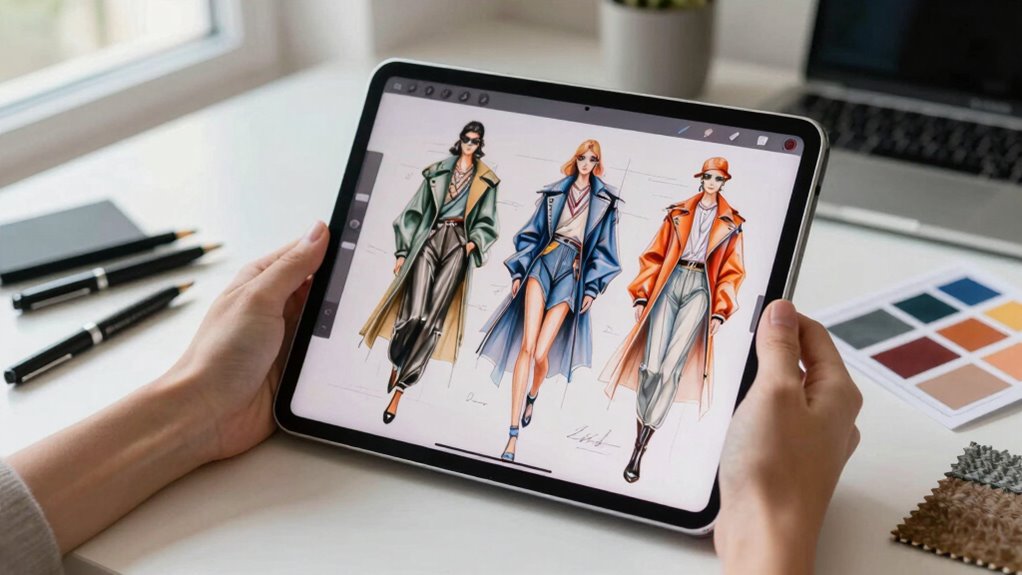

For fashion sketching, I’d choose the Apple iPad Pro 13-inch (M5) as the best overall pick: its large, high-quality display gives detailed garment work and layered illustrations room to breathe. The iPad Air 13-inch (M4) is a strong alternative for artists who want a big canvas without stepping up to the Pro, while the iPad 11-inch (A16) makes more sense for everyday sketching and portability. The main tradeoffs are screen area, Apple Pencil compatibility, storage, and whether a renewed older model is worth its lower performance ceiling. Read on for how each option fits a different fashion workflow, plus what to check before choosing an iPad for fashion sketching.

Get beauty and skincare favorites delivered free with Prime
- Fast, free delivery on millions of items
- Prime Video, Amazon Music and more included
- Member-only deals all year
Complete the kit


Key Takeaways
- The 13-inch iPad Pro M5 leads for detailed work because its large Ultra Retina XDR display pairs ample drawing space with a high-end feature set.
- The 13-inch iPad Air M4 is the large-canvas alternative for artists who want room for full figures and outfit variations without choosing the Pro tier.
- The iPad 11-inch A16 is the practical modern entry point among the standard iPads here, with more storage than the 2021 64GB model.
- Older renewed iPad Pros trade newer capability for a more cautious purchase: the 12.9-inch third-generation model offers a spacious canvas, while the 9.7-inch 2016 model is the most constrained by age and storage.
- The RubensTab T11 Pro differs from the Apple options as a standalone drawing tablet, so buyers should verify app support and stylus behavior before choosing it for an iPad-specific workflow.
| Apple iPad Pro 13-inch (M5) with Ultra Retina XDR Display, 256GB, Wi-Fi 7, Face ID, Space Black |  | Best Overall for Professional Fashion Sketching | Display: 13-inch Ultra Retina XDR | Processor: Apple M5 | Storage: 256GB | VIEW ON AMAZON | See Our Full Breakdown |
| Apple iPad 2021 (10.2-inch, Wi-Fi, 64GB) – Space Gray (Renewed) |  | Best Renewed Starter iPad | Model: iPad 9th Generation | Model year: 2021 | Display: 10.2-inch Retina | VIEW ON AMAZON | See Our Full Breakdown |
| Apple iPad 11-inch (A16 Chip, 128GB, Wi-Fi, Pink) |  | Best for Beginner-to-Intermediate Sketchers | Display: 11-inch Liquid Retina with True Tone | Processor: Apple A16 | Storage: 128GB | VIEW ON AMAZON | See Our Full Breakdown |
| RubensTab T11 Pro Standalone Drawing Tablet |  | Best Standalone Drawing Tablet | Screen size: 10.1 inches | Resolution: 1920 × 1200 | Battery capacity: 5800mAh | VIEW ON AMAZON | See Our Full Breakdown |
| Apple iPad Pro 9.7-inch, 32GB, Wi-Fi, Rose Gold (2016, Renewed) |  | Best Compact Renewed Pick | Model: iPad Pro MM172LL/A | Release year: 2016 | Display: 9.7-inch LCD, 2048 × 1536 resolution | VIEW ON AMAZON | See Our Full Breakdown |
| Apple iPad Pro 12.9-inch 3rd Generation – Wi-Fi, 256GB, Space Gray (Renewed) |  | Best Large-Canvas Value | Display: 12.9-inch Liquid Retina | Processor: A12X Bionic chip with Neural Engine | Storage: 256GB | VIEW ON AMAZON | See Our Full Breakdown |
| Apple iPad Air 13-inch (M4) with Liquid Retina Display, 128GB, Wi-Fi 7, Touch ID, Space Gray |  | Best Large-Screen Modern Air | Display: 13-inch Liquid Retina | Processor: Apple M4 chip | Storage: 128GB | VIEW ON AMAZON | See Our Full Breakdown |
| ipad for fashion sketching | Display | Storage | Connectivity | Battery life |
|---|---|---|---|---|
| Apple iPad Pro 13-inch | 13-inch Ultra Retina XDR | 256GB | Wi-Fi 7 | All-day |
| Apple iPad 2021 | 10.2-inch Retina | 64GB | Wi-Fi | Up to 10 hours |
| Apple iPad 11-inch | 11-inch Liquid Retina with True Tone | 128GB | Wi-Fi 6 | All-day |
| RubensTab T11 Pro Standalone D | — | — | — | Up to 5 hours |
| Apple iPad Pro 9.7-inch | 9.7-inch LCD, 2048 × 1536 resolution | 32GB | Wi-Fi, Bluetooth 4.2 | Up to 10 hours |
| Apple iPad Pro 12.9-inch 3rd G | 12.9-inch Liquid Retina | 256GB | Wi-Fi | — |
| Apple iPad Air 13-inch | 13-inch Liquid Retina | 128GB | Wi-Fi 7 with Apple N1 | All-day |
More Details on Our Top Picks
Apple iPad Pro 13-inch (M5) with Ultra Retina XDR Display, 256GB, Wi-Fi 7, Face ID, Space Black
For fashion sketching that spans loose concepts, layered illustrations, and detailed fabric studies, the 13-inch Ultra Retina XDR display gives the most room in this group for both drawing and tool panels. The M5 chip is a stronger fit for demanding creative workflows than the A16 iPad, while ProMotion and P3 wide color support a fluid, color-rich canvas. Compared with the 13-inch iPad Air M4 in this roundup, this Pro is the more display-focused choice; the Air may suit artists who want a large canvas without prioritizing the Pro screen features. The tradeoff is practical: its 1.28-pound weight is less convenient for quick sketches on the go, and 256GB may feel limiting if you keep many large projects locally. I’d skip it for casual sketching when a smaller, simpler iPad is enough.
Pros:- Large 13-inch canvas leaves room for artwork and app controls
- M5 chip is suited to demanding illustration workflows
- ProMotion and P3 wide color support fluid drawing and expressive color work
- Wi-Fi 7 provides the listed fastest connectivity in this group
Cons:- At 1.28 pounds, it is less convenient to carry than the 11-inch iPad
- The 256GB configuration may constrain artists who store many large files locally
- Its advanced performance and display may be more than beginners need
Best for: Fashion illustrators who work with many layers, need a large color-rich canvas, and want substantial performance headroom.
Not ideal for: Casual sketchers or commuters who prefer a lighter, less costly tablet and do not need a large display or high-end creative performance.
- Display:13-inch Ultra Retina XDR
- Processor:Apple M5
- Storage:256GB
- Connectivity:Wi-Fi 7
- Cameras:12MP front and 12MP back with LiDAR Scanner
- Battery life:All-day
- Weight:1.28 pounds
- Color:Space Black
Our verdict“Choose this Pro for a spacious, high-performance fashion illustration setup; choose the 11-inch A16 iPad if portability matters more.”
Apple iPad 2021 (10.2-inch, Wi-Fi, 64GB) – Space Gray (Renewed)
This renewed 9th-generation iPad makes sense for someone who wants to learn digital fashion sketching without starting with a premium tablet. Its 10.2-inch Retina display gives beginners a workable area for outfits and figure studies, and the A13 Bionic chip is suited to basic creative tasks. Compared with the newer 11-inch iPad with A16, this model has less storage and an older chip, so I’d favor the A16 when sketching is likely to become a regular, more demanding part of your workflow. The 64GB capacity is the main constraint: project files, reference images, and apps can fill it quickly. It is also a renewed device with a 90-day warranty, rather than a new model. I’d choose it for introductory practice, but skip it if you need substantial space for a growing portfolio.
Pros:- 10.2-inch Retina display provides a useful starter canvas
- A13 Bionic chip supports basic creative and productivity tasks
- Renewed condition includes a 90-day warranty
- Listed battery life is up to 10 hours
Cons:- 64GB storage can fill quickly with apps, references, and illustration files
- Older hardware is less appealing for a long-term, demanding drawing setup
- Renewed condition may not suit buyers who want a new device
Best for: New digital fashion sketchers who want a basic iPad for learning drawing apps and keeping a modest collection of projects.
Not ideal for: Working illustrators or students building a large offline portfolio, since 64GB storage and the older A13 chip leave less room to grow.
- Model:iPad 9th Generation
- Model year:2021
- Display:10.2-inch Retina
- Storage:64GB
- Processor:Apple A13 Bionic, 2.65 GHz
- Connectivity:Wi-Fi
- Battery life:Up to 10 hours
- Warranty:90 days
Our verdict“Pick this renewed iPad for entry-level sketch practice, but step up to the 11-inch A16 model for more storage and a newer platform.”
Apple iPad 11-inch (A16 Chip, 128GB, Wi-Fi, Pink)
The 11-inch iPad with A16 is the balanced pick for sketchers who want more room and storage than the renewed 9th-generation model without carrying a 13-inch tablet. Its 128GB capacity gives a growing fashion portfolio more breathing room than the older iPad’s 64GB, while the Liquid Retina display with True Tone adapts its appearance to ambient light. The A16 chip suits everyday drawing and editing, though the M5 iPad Pro is the better match for artists who need a larger, more advanced display and greater performance headroom. This model’s 1.05-pound weight makes it easier to take to class or work on outfit ideas away from a desk. Apple Pencil and keyboard accessories are sold separately, and this Wi-Fi version has no cellular connectivity. I’d choose it as a flexible middle ground, not as a substitute for the Pro’s expansive canvas.
Pros:- 11-inch display balances drawing space with portability
- 128GB storage offers more room than the 64GB renewed iPad
- A16 chip is suited to everyday creative tasks
- True Tone and all-day battery life support flexible use
Cons:- Apple Pencil is sold separately
- Wi-Fi-only configuration has no cellular connectivity
- Smaller canvas and fewer Pro display features than the 13-inch iPad Pro
Best for: Fashion students and developing illustrators who want a portable iPad for regular sketching, reference viewing, and everyday creative work.
Not ideal for: Professionals who need the largest drawing area and Pro display features, or artists who require cellular connectivity while away from Wi-Fi.
- Display:11-inch Liquid Retina with True Tone
- Processor:Apple A16
- Storage:128GB
- Connectivity:Wi-Fi 6
- Cameras:12MP front with Center Stage; 12MP back
- Security:Touch ID
- Battery life:All-day
- Weight:1.05 pounds
- Color:Pink
Our verdict“Choose this model for a portable, capable everyday sketching iPad; pick the 13-inch Pro if canvas size and display capability come first.”
RubensTab T11 Pro Standalone Drawing Tablet
The RubensTab T11 Pro takes a different route from the Apple models: it is a standalone drawing tablet with a pressure-sensitive pen and drawing apps listed as pre-installed, rather than an iPad that also handles a broad range of everyday tasks. Its 10.1-inch Full HD screen is close in size to the renewed 10.2-inch iPad, and the adjustable pen sensitivity speaks directly to artists who want pressure variation for line weight and shading. The included stand case and gloves make it a ready-to-draw package, while the 13-inch iPad Pro offers a much larger canvas and all-day battery life. Here, the up-to-five-hour battery is a real limit for long studio sessions or travel without power. I’d shortlist it when drawing is the main job and standalone operation matters more than the broader Apple ecosystem.
Pros:- Works as a standalone drawing tablet without a computer
- Adjustable pressure sensitivity supports varied line work
- 10.1-inch Full HD IPS screen offers a dedicated drawing surface
- Includes a digital pen, gloves, and adjustable stand case
Cons:- Battery life is listed at up to five hours, limiting extended sessions away from power
- Smaller display than the 13-inch iPad Pro
- Pre-installed drawing apps may take time for beginners to learn
Best for: Artists seeking a self-contained sketching device with a pressure-sensitive pen and included drawing accessories.
Not ideal for: Fashion students who need all-day battery life, a large canvas, or the wider everyday app and device experience offered by an iPad.
- Screen size:10.1 inches
- Resolution:1920 × 1200
- Battery capacity:5800mAh
- Battery life:Up to 5 hours
- Charging:USB-C
- Pen:Adjustable pressure sensitivity
- Touch:Multi-touch
- Included accessories:Digital pen, stylus, gloves, cleaning cloth, adjustable stand case
- Pre-installed apps:Professional-grade drawing apps
Our verdict“Choose the RubensTab when a self-contained drawing-focused setup and included accessories matter more than battery endurance or iPad versatility.”
Apple iPad Pro 9.7-inch, 32GB, Wi-Fi, Rose Gold (2016, Renewed)
For sketchers who favor a small, easy-to-carry tablet, this renewed 9.7-inch iPad Pro offers a compact canvas with a 2048 × 1536 display, wide color gamut, and True Tone. Its screen features give it a more color-focused specification than the basic 10.2-inch renewed iPad, but the age of this 2016 model and its 32GB storage make it a narrow choice for fashion work. The 11-inch A16 iPad is a more practical everyday pick, with newer hardware and four times the listed storage, while this model may suit occasional outfit thumbnails and reference viewing. It weighs 15.36 ounces and has up to 10 hours of listed battery life. The renewed condition, unknown software update support, and limited capacity are meaningful tradeoffs; I would not choose it as the foundation for a growing professional portfolio.
Pros:- Compact 9.7-inch size is easy to carry
- 2048 × 1536 display includes wide color gamut and True Tone
- Up to 10 hours of listed battery life
- Renewed unit includes a minimum 90-day limited warranty
Cons:- 32GB storage is restrictive for a collection of apps and fashion illustration files
- Software update support is listed as unknown
- 2016 release makes it an older choice than the 11-inch A16 iPad
Best for: Artists who prioritize a compact, color-capable screen for occasional fashion thumbnails and light sketching.
Not ideal for: Buyers who need a long-term primary sketching device, ample project storage, or confidence about ongoing software update support.
- Model:iPad Pro MM172LL/A
- Release year:2016
- Display:9.7-inch LCD, 2048 × 1536 resolution
- Storage:32GB
- RAM:2GB
- Connectivity:Wi-Fi, Bluetooth 4.2
- Battery life:Up to 10 hours
- Weight:15.36 ounces
- Warranty:Minimum 90-day limited warranty
Our verdict“Choose this renewed Pro only if compact size and a color-capable display outweigh its limited storage and uncertain software support.”
Apple iPad Pro 12.9-inch 3rd Generation – Wi-Fi, 256GB, Space Gray (Renewed)
The 12.9-inch Liquid Retina display gives fashion sketchers more room for full figures, outfit variations, and reference images than compact iPads, while the 256GB storage leaves space for layered artwork and project files. Its A12X Bionic chip is an older generation, but the listed hardware is still aimed at demanding creative work. Compared with the newer 13-inch iPad Air with M4, this renewed Pro offers more storage, while the Air brings a newer chip and Wi-Fi 7. The main tradeoff is age: this is a 2018 renewed model, with condition variation possible and only a 90-day limited warranty. I’d choose it for a spacious drawing surface on a tighter budget, not for buyers who want the newest platform or cellular connectivity.
Pros:- 12.9-inch display gives more working room for garment details and side-by-side references.
- 256GB storage accommodates substantial collections of sketches and project files.
- A12X Bionic chip is built for responsive creative and productivity tasks.
- Face ID provides convenient secure authentication.
Cons:- Renewed condition may vary, so cosmetic wear is less predictable than with a new device.
- 90-day limited warranty offers less coverage than many buyers may want for a drawing device.
- 2018 model and Wi-Fi-only connectivity lack the newer platform and cellular option found on some alternatives.
Best for: Fashion students and hobby illustrators who want a large drawing area and 256GB for sketches and reference files without choosing the newest model.
Not ideal for: Artists who need cellular data, a longer warranty, or a newer device generation; the renewed condition and 90-day coverage may be a poor fit.
- Display:12.9-inch Liquid Retina
- Processor:A12X Bionic chip with Neural Engine
- Storage:256GB
- Connectivity:Wi-Fi
- Camera:12MP rear, 7MP front
- Model year:2018
- Color:Space Gray
- Warranty:90-day limited warranty
Our verdict“Choose this renewed Pro if a large canvas and 256GB matter more than a newer chip, cellular access, or longer warranty coverage.”
Apple iPad Air 13-inch (M4) with Liquid Retina Display, 128GB, Wi-Fi 7, Touch ID, Space Gray
For sketchers who want a 13-inch drawing surface without stepping up to the iPad Pro, this iPad Air pairs a roomy Liquid Retina display with the M4 chip. That combination suits detailed fashion illustration, quick edits, and keeping reference material visible alongside a canvas. It also supports Apple Pencil, which is central to a natural drawing workflow, and Wi-Fi 7 can help when moving large files over a compatible network. Compared with the renewed 12.9-inch iPad Pro 3rd Generation, this Air has a newer chip and stated all-day battery life, but half the storage in this configuration and no cellular connectivity listed. Its 1.36-pound weight and 13-inch size favor desk or studio work over compact portability. I’d pick it for a current, large-screen creative setup, provided 128GB is enough.
Pros:- 13-inch Liquid Retina display provides ample room for garment details and visual references.
- M4 chip offers a newer performance platform than the 2018 renewed iPad Pro.
- Apple Pencil compatibility supports stylus-based sketching.
- Wi-Fi 7 and stated all-day battery life suit connected creative work away from a desk.
Cons:- 128GB storage may constrain large art libraries and layered project files.
- Wi-Fi-only configuration has no 5G connectivity listed.
- At 1.36 pounds with a 13-inch screen, it is less compact for drawing on the move.
Best for: Fashion illustrators who want a large canvas, a current M4-powered iPad, and Apple Pencil compatibility for regular studio or school work.
Not ideal for: Artists with large offline reference libraries or extensive project archives who need more than 128GB, and buyers who require cellular connectivity.
- Display:13-inch Liquid Retina
- Processor:Apple M4 chip
- Storage:128GB
- Connectivity:Wi-Fi 7 with Apple N1
- Front camera:12MP with Center Stage
- Back camera:12MP Wide, 4K video
- Battery life:All-day
- Dimensions and weight:11.05 x 8.46 x 0.24 inches; 1.36 pounds
- Color:Space Gray
Our verdict“Choose this iPad Air if you want a modern, large-screen Apple Pencil setup and can work within 128GB of storage.”

How We Picked
I ranked these options around the needs of fashion sketching: a display large enough for figures and garment details, responsive drawing input, room for reference images and layered files, and a form factor that suits how an artist works. I also weighed age, storage, connectivity, and the practical uncertainty that comes with renewed devices. A newer chip alone does not make a tablet the best sketching choice if the screen feels cramped or the intended stylus and drawing apps are not supported.
The 13-inch iPad Pro M5 ranks first for its combination of canvas size and premium display. The 13-inch Air M4 follows as the large-screen alternative, while the 11-inch A16 earns a place for buyers who value a current, portable iPad over maximum workspace. Older renewed iPads rank lower because their age and limited storage can narrow long-term flexibility; the standalone RubensTab is included for shoppers open to a non-Apple drawing setup, but its fit depends more heavily on checking software and stylus compatibility.
| ipad for fashion sketching | Processor | Connectivity | Battery life | Color |
|---|---|---|---|---|
| Apple iPad Pro 13-inch | Apple M5 | Wi-Fi 7 | All-day | Space Black |
| Apple iPad 2021 | Apple A13 Bionic, 2.65 GHz | Wi-Fi | Up to 10 hours | — |
| Apple iPad 11-inch | Apple A16 | Wi-Fi 6 | All-day | Pink |
| RubensTab T11 Pro Standalone D | — | — | Up to 5 hours | — |
| Apple iPad Pro 9.7-inch | — | Wi-Fi, Bluetooth 4.2 | Up to 10 hours | — |
| Apple iPad Pro 12.9-inch 3rd G | A12X Bionic chip with Neural Engine | Wi-Fi | — | Space Gray |
| Apple iPad Air 13-inch | Apple M4 chip | Wi-Fi 7 with Apple N1 | All-day | Space Gray |
Factors to Consider When Choosing Ipad For Fashion Sketching
Fashion illustration puts unusual demands on a tablet: a sketch may begin as a quick silhouette, then grow into a layered design with fabric references, colorways, and presentation notes. I’d choose around the way you build and revise a garment, not just the device’s headline specifications.
Choose screen size around the work you actually draw
A large display gives a full fashion figure more room and reduces the need to zoom and pan while refining seams, prints, or accessories. It can also make side-by-side reference work easier, but a larger tablet takes up more space in a bag and can feel awkward to hold for long sketching sessions. An 11-inch model suits thumbnailing, travel, and quick concept work; it may feel tight when a detailed figure and reference image must stay visible together. Don’t choose by diagonal measurement alone: think about whether you draw seated at a desk, on your lap, or while moving between classes. If you routinely develop full-page looks, prioritizing canvas area can matter more than buying the newest chip.
Check stylus and app compatibility before buying
A tablet is only a useful sketchbook if the stylus you plan to use works with that exact model. Apple Pencil support varies by iPad generation, and newer iPads do not all share the same Pencil compatibility, so confirm the pairing before ordering accessories. Pressure sensitivity, tilt behavior, palm rejection, and comfortable charging or storage can change how natural linework feels. App availability matters too: make sure your preferred drawing app runs on the device and supports the layers, brushes, and export formats you need. This check is especially important for older renewed iPads and the RubensTab, since its drawing experience depends on its own supported stylus and software ecosystem.
Match storage to layered fashion projects
Fashion sketches can take more space than a folder of flattened images: layered files, imported fabric photographs, reference boards, and exported presentations accumulate quickly. A 64GB device may work for occasional sketches stored in the cloud, but it leaves less room for a sizable offline library or many active projects. Cloud storage can help, though it does not replace local space when traveling without reliable access or when working with large files. Before choosing a capacity, estimate how many projects you keep on the tablet and whether you regularly move files to a computer or external service. Buyers choosing an older model should treat limited storage as a lasting workflow constraint, not a small specification difference.
Decide when a premium display or chip is worth paying for
A premium iPad can make color, fine detail, and multitasking more pleasant, but not every fashion sketch requires the highest performance tier. If your work is mostly line drawings, simple color studies, and mood boards, a current standard iPad may leave more budget for a stylus, case, or drawing stand. Artists who manage complex layered canvases, use several creative apps, or want a large, refined display have a stronger reason to choose a Pro model. The Air can be a sensible middle ground when canvas size matters more than Pro-specific features. Spend on the device capabilities that shape your daily workflow, rather than assuming the most expensive model automatically improves your drawing.
Treat renewed models as a tradeoff, not a shortcut
A renewed iPad can offer a larger or higher-tier screen than a newer entry model, but age brings questions that the product name alone cannot answer. Check the seller’s condition terms, return window, battery coverage, and included accessories before relying on it for daily creative work. Older hardware may also limit software support or compatibility with current styluses and apps, reducing the useful life of the purchase. A renewed 12.9-inch model may appeal if workspace is the priority, while the 9.7-inch 2016 model is harder to justify for demanding, long-term projects. Compare the complete setup—including Pencil, protection, and storage needs—rather than judging a renewed device by its model tier alone.
Plan for posture, references, and portability
Fashion sketching often involves long sessions and frequent glances between a canvas and visual references, so the stand and working position can shape comfort as much as the tablet itself. A case with stable viewing angles or a separate stand can keep the screen upright and make tracing proportions easier. Larger tablets work well on a desk but can be less convenient for drawing while standing or commuting. Smaller models travel easily, though you may need to zoom more and switch between references and the canvas. Decide where the tablet will live during a typical session, then include its case, stand, and stylus in your portability plan.
Frequently Asked Questions
Is the 13-inch iPad Pro M5 worth choosing over the 13-inch iPad Air M4 for fashion illustration?
I’d choose the Pro if you regularly work on detailed, layered designs and value its premium display experience alongside the larger canvas. The Air M4 is the more measured choice when screen area is your main priority and you do not need the Pro tier’s added capabilities. Both 13-inch models offer room for full figures and references, so the difference is less about basic sketching and more about how demanding your creative workflow is. Set aside room in your budget for a compatible Pencil and a comfortable stand before deciding. If your projects are mostly simple linework, the Air may be the more sensible fit.
Can a 64GB renewed iPad handle a fashion sketching workflow?
It can handle occasional sketches, particularly if you keep only current projects on the device and move finished work to cloud storage or another archive. The limit becomes more noticeable with layered files, saved reference photos, downloaded brushes, and multiple apps. Offline work also makes cloud-based storage less convenient, since you may want several projects and references available at once. For a beginner testing digital drawing, 64GB may be workable with regular file cleanup. If you expect to build a long-running portfolio on the iPad, a higher-capacity option is a safer choice.
Should I buy an older renewed iPad Pro or a newer standard iPad for drawing?
I’d compare the older Pro’s larger screen against the newer standard iPad’s age, storage, and accessory compatibility rather than relying on the Pro name. A renewed 12.9-inch model may suit artists who need more drawing area, but its condition and remaining software support deserve careful checking. The iPad 11-inch A16 is a more current, portable choice for general sketching, though its smaller canvas can feel limiting for detailed garment work. Check exact Apple Pencil support for both models before buying, since the stylus is central to the experience. For a device you plan to use daily for years, the newer model may be the lower-risk pick.
Is a standalone RubensTab a good choice if I already use Apple drawing apps?
Not automatically: the RubensTab is a separate drawing-tablet option, so its software environment may not match an iPad-based workflow. Before choosing it, confirm that it runs the apps you rely on, supports the file formats you exchange, and works with a stylus that suits your drawing style. If you collaborate through Apple-specific apps or want to continue projects across Apple devices, an iPad is likely the more straightforward fit. The RubensTab may make sense for someone open to its own app ecosystem and standalone setup. Check those workflow details before treating it as a direct substitute for an iPad.
Do I need a 13-inch iPad for full-figure fashion sketches?
No, but a 13-inch screen gives a full figure and garment details more working room, especially when references or layers are open alongside the canvas. An 11-inch iPad can still handle full-figure sketches if you are comfortable zooming, panning, and managing references in separate views. Screen size also affects portability and how easily you can draw without a desk. If you mainly create thumbnails and outfit concepts, a smaller model may be easier to carry and use casually. If you routinely refine details or compare variations side by side, the larger canvas is more useful.
Conclusion
For the strongest all-around choice, I’d pick the iPad Pro 13-inch (M5) for artists who want a spacious canvas and premium display. The iPad Air 13-inch (M4) is my best value for a large-screen fashion workflow, while the iPad 11-inch (A16) is the best beginner option for someone who wants a current, portable iPad without starting with a Pro. For a specific need, the renewed 12.9-inch iPad Pro may suit a buyer prioritizing a large workspace, provided its condition, stylus support, and remaining software life check out. I’d choose the RubensTab T11 Pro only if its apps and stylus fit your existing workflow; the renewed 9.7-inch Pro and 64GB 2021 iPad make the most sense for light sketching with clear expectations about age, space, and capability.